> For the complete documentation index, see [llms.txt](https://help.distro.so/llms.txt). Markdown versions of documentation pages are available by appending `.md` to page URLs; this page is available as [Markdown](https://help.distro.so/routing/form-router/distribution-method.md).
# Distribution methods
Understanding Distro's Round Robin Meeting Distribution Methods
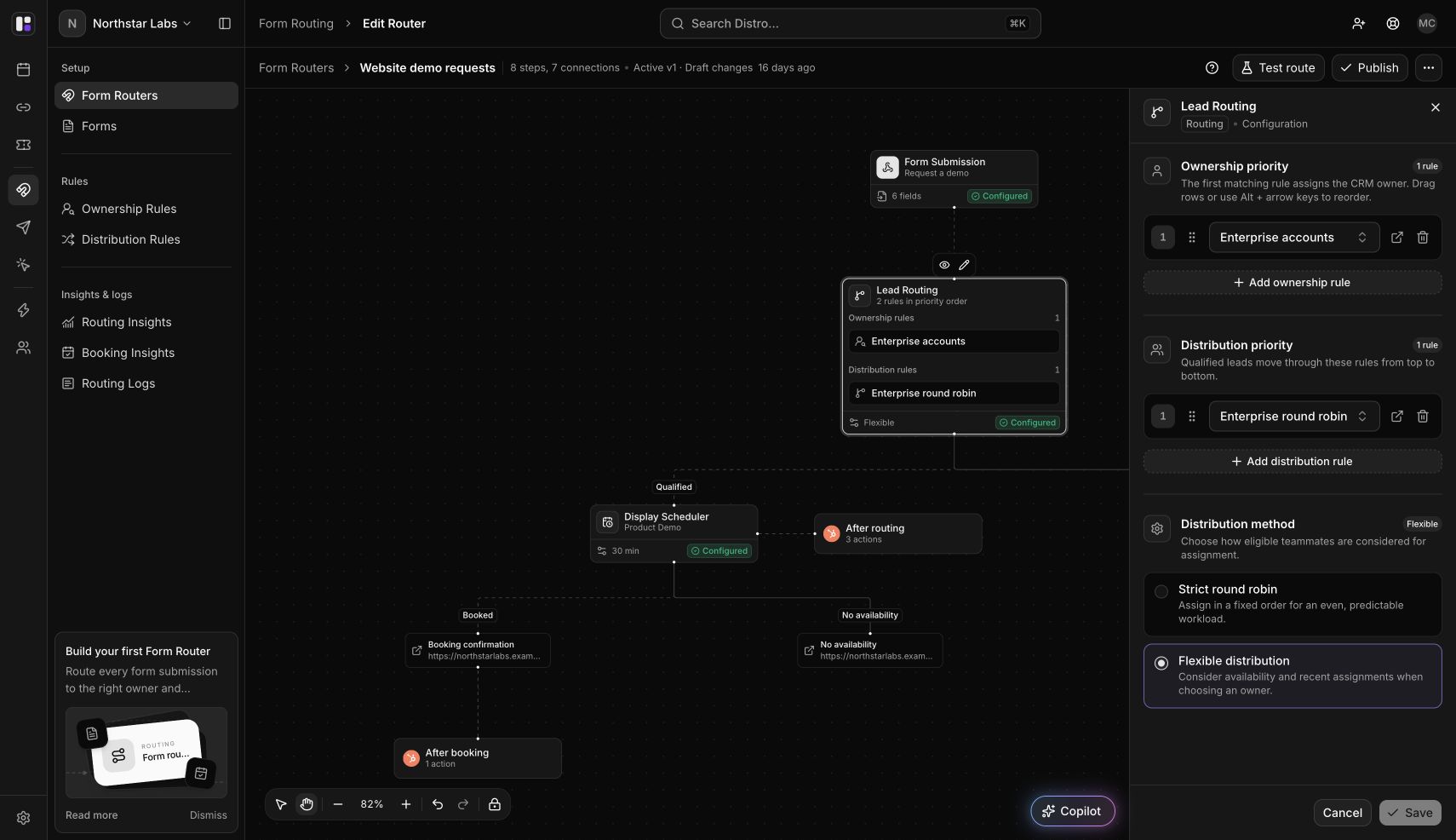
Choose whether Distro should select a host before the prospect sees available times or after they choose a slot.
| Method | What the prospect sees | When the host is selected | Choose it when… |
| ------------------------- | ------------------------------------------ | ------------------------------------------------------------------ | ----------------------------------------------------------- |
| **Strict round robin** | The selected host's available times. | Before the prospect chooses a time. | Assigning a particular host before scheduling matters most. |
| **Flexible distribution** | Available times across eligible teammates. | After the prospect chooses a slot, among teammates available then. | Offering more scheduling options matters most. |
This setting controls distribution. Ownership rules are evaluated first and can assign an existing CRM owner before distribution is needed.
### Set the method for a Form Router
{% stepper %}
{% step %}
#### Open Lead Routing
Open **Form routing → Form Routers**, select your router, then click the **Lead Routing** card.
{% endstep %}
{% step %}
#### Choose and save the method
Under **Distribution method**, select **Strict round robin** or **Flexible distribution**, then **Save**. Check that your distribution rules include the intended team and participants.
{% endstep %}
{% step %}
#### Test and publish
Use **Test route** to inspect the saved configuration, then choose **Publish** to activate it. Check a real controlled submission separately to verify live calendar availability.
{% endstep %}
{% endstepper %}
For a Click Router, the method is under **Fallback assignment → Distribution method**.
### How assignment stays balanced
Distro considers assignment history and member weights during the workspace's reset period. Credits and recent assignments can affect priority. Equal weights express equal intended shares; a larger weight expresses a larger intended share.
**Strict round robin does not guarantee an alphabetical or fixed turn-by-turn sequence.** Flexible distribution also uses weights and credits; it does not simply choose whoever has the fewest calendar meetings.
Actual totals can differ because of availability, repeated prospects, credits, and vacation settings. Within two hours, a repeat submission from the same email can retain the previous eligible host. Flexible distribution also checks that host's availability for the selected slot.
Rescheduling an existing meeting uses its assigned host's availability rather than redistributing it across the team.
### CRM owner updates
Configure owner updates on the [distribution rule](https://help.distro.so/routing-rules/distribution-rules). Strict distribution can queue an owner update during routing. Flexible distribution can queue it after booking, once the host is selected. Flexible mode does not disable owner updates.
### Investigate an unexpected assignment
| Check | Where to look |
| --------------------------------- | ----------------------------------------------------------------------------------------------------------------------------------------------------------- |
| Which rule handled the prospect | **Routing Logs** |
| Eligible participants and weights | The matched **Distribution Rule → Assignment** settings |
| Credits and recent assignments | [Distribution history](https://help.distro.so/routing-rules/distribution-rules/distribution-history) |
| Reset-period behavior | [Calibration](https://help.distro.so/settings/workspace-settings/calibration) |
| Missing hosts or times | [Vacation](https://help.distro.so/settings/workspace-settings/vacation) and [Availability preview](https://help.distro.so/settings/calendar-troubleshooter) |
After editing a live router, follow [Router versions](https://help.distro.so/routing/router-versions) so the intended configuration reaches new submissions.
---
# Agent Instructions
This documentation is published with GitBook. GitBook is the documentation platform designed so that both humans and AI agents can read, navigate, and reason over technical content effectively. Learn more at gitbook.com.
## Querying This Documentation
If you need additional information that is not directly available in this page, you can query the documentation dynamically by asking a question.
Perform an HTTP GET request on the current page URL with the `ask` query parameter, and the optional `goal` query parameter:
```
GET https://help.distro.so/routing/form-router/distribution-method.md?ask=&goal=
```
`ask` is the immediate question: it should be specific, self-contained, and written in natural language.
`goal` is optional and describes the broader end goal you are ultimately trying to accomplish on behalf of the user. GitBook uses it to tailor the answer towards what is most useful for that goal.
The response will contain a direct answer to the question and relevant excerpts and sources from the documentation.
Use this mechanism when the answer is not explicitly present in the current page, you need clarification or additional context, or you want to retrieve related documentation sections.